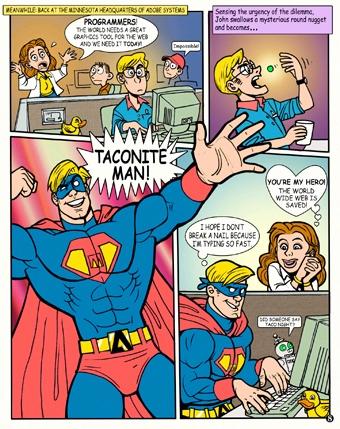
Adobe Photoshop 8 Easter Egg - Taconite Man - Photoshop CS
1) Use Resource Hacker (Google it) to open C:\Program Files\Adobe\Photoshop CS\Photoshop.dll
2) Look for the folder tree named "Bitmap" and click the plus sign to expand it.
3) look for the folder tree named "5037" and click the plus sign to expand it.
4) Click on "1033" below the expanded "5037" and view Taconite Man! (I suggest you save it first as a bitmap to view the whole picture)
To view it, click http://i17.tinypic.com/44v8myf.jpg
| User Rating: |
9.2
9.2/10 with 15 votes
|
| Contributed By: |
htd82002 on 01-08-2007 |
| Reviewed By: |
racedogg2, MorPH |
Special Requirements: Resource Hacker
Pictures and Videos
 |
| Taconite Man comic strip |
Do you have another one?
Send us a picture or video of this Egg!
Comments