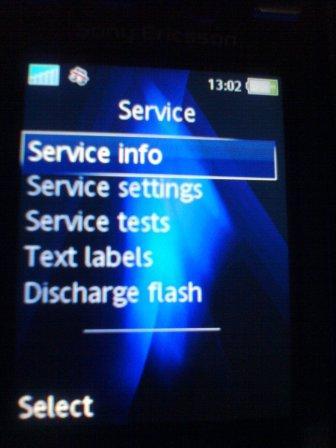
SonyEricsson and Ericsson cell phones Easter Egg - Secret "Service" Menu
When you press ->, *, <-, <-, *, <-, you will reach the secret "Service" menu. There you can get information about your cell phone and watch cool tests. The "Display" test is very nice on colour cell phones. You can also change your contrast more precisely
User Rating:
5.3
5.3/10 with 41 votes
Contributed By:
Anonymous on 07-23-2005
Reviewed By:
DomFeargrieve, Techneon
Special Requirements: Ericsson / SonyEricsson cell phone
The 'Main' Service Menu, on a Sony Ericsson K810i. Accessed by pressing ->,*,<-,<-,*,<-,* (right, star, left, left, star, left, star) when no menu is open (i.e. when you can see your wallpaper, screensaver etc.)
I don't get it, I have a T 610 cellphone, can you be more specific about the procedure?
38 of 72 people found this comment helpful. Did you?
Amnesiac writes:
Doesn't work on a T630 either following those instructions.
38 of 72 people found this comment helpful. Did you?
Hampus Adler writes:
For T610 and up the code is ->,*,<-,<-,*,<-,*
38 of 72 people found this comment helpful. Did you?
Amnesiac writes:
Hampus Adler's method works fine on the T630.
38 of 72 people found this comment helpful. Did you?
User writes:
For updated information on accessing this code on newer phones, visit the Sony Ericsson developer website at http://developer.sonyericsson.com/viewSolution.do?id=6689
38 of 72 people found this comment helpful. Did you?
Penfold writes:
Hampus Adler's method works on the W100i!!
38 of 72 people found this comment helpful. Did you?