Paint Easter Egg - Invisible Ink
In Paint you may be familiar with the secret X10 zoom, but there is also a secret paintbrush size- invisible ink.
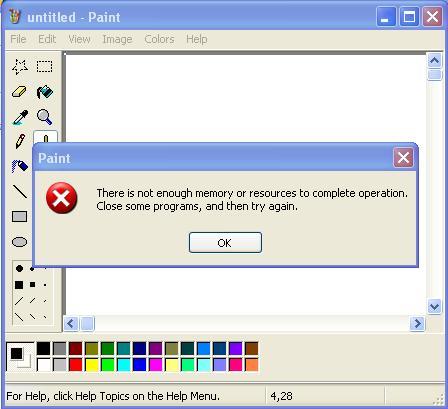
If you click to the right of the smallest square paintbrush size it will seem like nothing is highlighted, but, just like the secret X10 zoom, you have actually highlighted the invisible ink button. If you try the circle paintbrush you get a memory error.
After selecting it you can draw normally on the screen, using the normal left mouse button. (It will look like nothing shows up, but it is invisible)You may get the alert noise through your speakers, but it has worked.
In order to uncover the invisible ink you have to highlight the largest size square from the paintbrush options then glide it WITHOUT CLICKING over the invisible picture. The invisible ink will come out in whatever colour you had for it.
| User Rating: |
8.8
8.8/10 with 47 votes
|
| Contributed By: |
The Haz on 04-30-2008 |
| Reviewed By: |
MonicaIngram |
Pictures and Videos
 |
| The Error Message You Will Get |
Do you have another one?
Send us a picture or video of this Egg!
Comments