Hiptop (t-mobile's Sidekick) Easter Egg - Snowbored
1. Go to the Jump screen. Press Menu and go to Settings. Press About Sidekick.
2. When the credits start to come out press Menu+Shift+8
3. Use space bar to contol (on Sidekick II you can click or click&hold the scroll wheel to control: holding it down moves man up and releasing moves him down.)
| User Rating: |
9.2
9.2/10 with 45 votes
|
| Contributed By: |
Anonymous on 06-02-2004 |
| Reviewed By: |
MrHappyHamster |
Special Requirements: color sidekick
Pictures and Videos
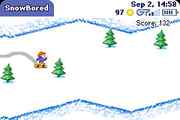 |
| SnowBored via Sidekick |
Do you have another one?
Send us a picture or video of this Egg!
Comments